

Votes can reveal demand, but they cannot set your roadmap. Feature request software gives teams a shared place to collect customer ideas, invite voting, and assess requests by user impact, feasibility, and other criteria. The goal is not to ship the most popular suggestion automatically. It is to understand what people need and make thoughtful, transparent decisions.
When feedback arrives through support conversations, sales calls, and scattered messages, patterns are easy to miss and expectations are harder to manage. A clear process brings requests together, lets customers support ideas that matter to them, and keeps discussion focused on real problems rather than vote counts alone.
This article explains how to collect useful requests, invite participation through voting, and prioritize ideas using practical criteria. You’ll also learn how to decline or defer a request respectfully, so customers understand the reasoning and know their feedback was considered.
Key Takeaways
- Bring requests from different channels into one place, then capture the problem, context, and intended benefit behind each idea.
- Use voting to surface shared interest, but weigh customer impact, strategic fit, and feasibility before setting roadmap priorities.
- Make idea boards easier to use by guiding contributors toward clear, specific submissions and inviting them to support relevant requests.
- When declining or deferring an idea, explain the decision and keep stakeholders informed as its status changes.
- Choose a consistent process that helps teams turn customer input into informed decisions, not just a longer list of suggestions.
What is feature request software?
Feature request software gives teams a shared system to collect, review, and prioritize ideas for product changes. Requests might describe a usability problem, an integration need, or new functionality. For example, a customer may request bulk export because downloading records one at a time slows their workflow. The request explains the problem; the proposed feature is one possible solution.
There is no universal “best” request management tool. Compare options by submission methods, voting, status updates, reporting, and connections to existing systems. A support queue can organize incoming issues, while a public board lets customers find and vote on related ideas. A centralized system can bring feedback from these sources together for product review.
For context, Ideawake reports average participation rates of 50%-80%, compared with typical rates of 5%-15% with other tools, according to Ideawake. Its reported average increase in engagement scores is 10%, according to Ideawake. Ideawake reports that the top 5% of ideas drive 95% of new business results, according to Ideawake. These are company-reported figures, not a guarantee of results for every organization.
Use this comparison to narrow your approach before evaluating products:
| Option | Submission sources | Voting and visibility | Roadmap support |
|---|---|---|---|
| Shared spreadsheet | Manual entry | Limited without a review process | Manual status tracking |
| Support-ticket queue | Support conversations | Organized around individual cases | Useful for issue triage |
| Public idea board | Customer submissions | Visible ideas and community votes | Can communicate request status |
| Central request system | Multiple feedback sources | Can group ideas and show demand | Supports planning and prioritization |
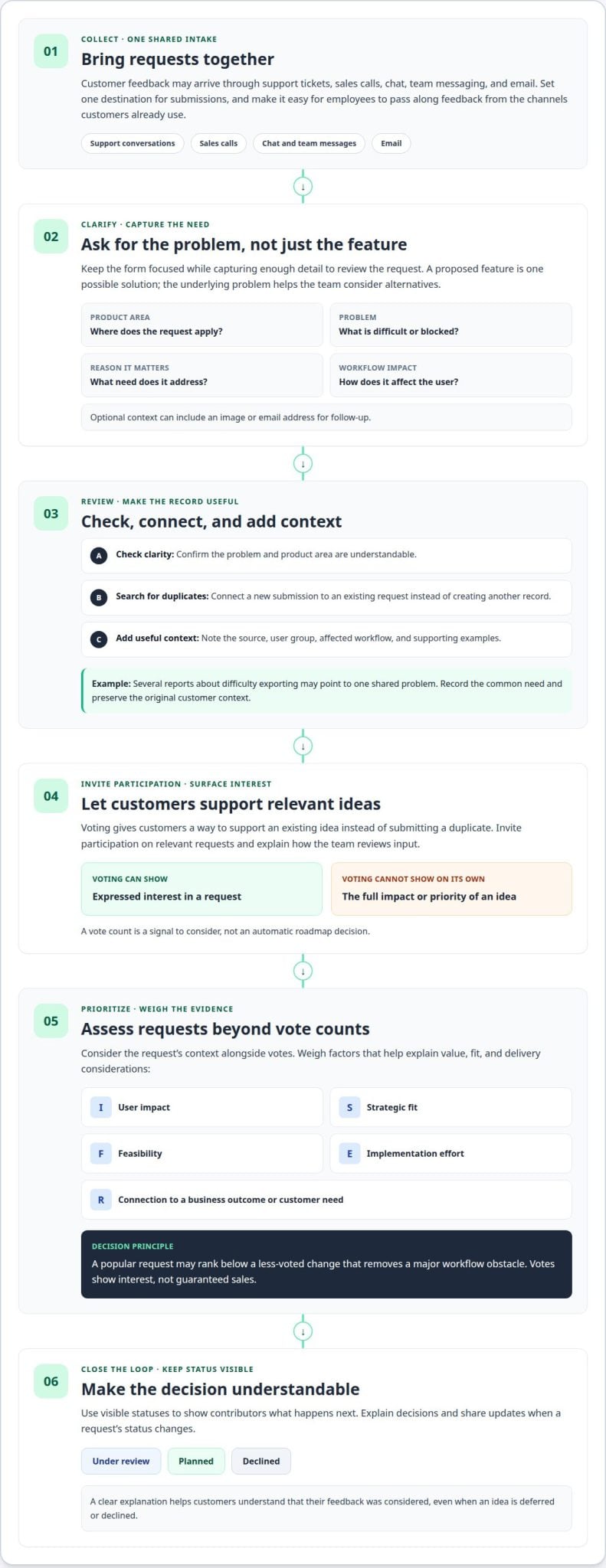
Small businesses can start with a clear submission form, searchable requests, simple status labels, and a reliable way to export data. To prioritize, weigh votes alongside user impact, strategic fit, effort, and feasibility. A popular request may rank below a less-voted change that removes a major workflow obstacle.
Assess revenue impact by connecting a request to a business outcome, such as supporting a customer segment or preserving an important workflow. Votes show interest, not guaranteed sales. Consider implementation effort and the needs of other users before assigning priority.
In the United States, costs depend on factors such as user access, integrations, reporting, and administration needs. Free plans and trials vary, so compare included capabilities and limits. In a security review, examine permissions, customer-data visibility, integrations, and how sensitive information is handled.
To link requests with product planning, track decisions and status changes in a shared workflow. Teams comparing platforms can use this guide to idea management software to assess their needs. For the next step from evaluation to execution, see this guide to implementing innovative ideas.
Feature request collection and voting
Customer requests arrive through support tickets, sales calls, chat, team messaging, and email. Without a clear intake route, the same idea can sit in several inboxes, separated from useful context. Set one destination for submissions, then make it easy for employees to pass along feedback from the channels customers already use.
For example, a support agent hears several customers describe difficulty exporting reports. Rather than treating each conversation as a separate request, the agent records the shared problem and attaches the original context. A consistent intake process helps enterprise teams spot recurring needs across departments, customer segments, and communication channels.
Keep the submission form focused, while collecting enough detail to make review useful. Ask for the product area, the problem, why it matters, and how it affects the user’s workflow. Let people attach an image when a screen or process is difficult to explain. An email address can support follow-up, while optional fields reduce friction for simple submissions.
After collecting requests, organize them so reviewers can understand and act on them:
- Review the incoming idea: Confirm the problem and product area are clear.
- Search for duplicates: Connect a new submission to an existing request instead of creating another record.
- Add useful context: Note the source, user group, workflow affected, and supporting examples.
- Set a visible status: Tell contributors whether the request is under review, planned, or declined.
This process turns scattered feedback into a searchable record and helps teams distinguish a proposed feature from the underlying need. A request for a dashboard filter, for example, may point to a broader difficulty finding records quickly. That distinction lets product teams evaluate different solutions without losing the customer’s original perspective.
Voting provides a participation signal: customers can support an existing idea instead of submitting a duplicate. But votes represent expressed interest, not a complete measure of impact. Review the request’s context alongside votes, then share updates when its status changes. A brief explanation of what happens next keeps contributors involved and makes the feedback loop visible.
To strengthen participation, tell customers where to submit ideas, invite them to vote on relevant requests, and explain how the team reviews input. Keep the prompt specific: “What task is difficult, and what would make it easier?” is more useful than asking for a feature wish list. Teams refining their wider idea intake can explore idea crowdsourcing methods and consider how a guided platform walkthrough could support their collection process.
Declining feature requests without disappointing customers
Declining a request is part of prioritization, not a judgment of the customer’s needs. Explain the decision clearly, for example, by citing limited capacity, weak strategic fit, or another solution that already addresses the problem. If a requested export duplicates an existing report, point customers to that workflow and record what remains difficult.
Capture the original context before making a decision. A customer conversation may reveal a need that a short request misses: an account manager might learn that teams manually combine reports before sharing them. Record the workflow, impact, and customer segment alongside the proposed feature. This preserves useful feedback even if the requested solution is not selected.
Use categories to distinguish themes such as usability, integrations, reporting, and new functionality. A dashboard filtered by category, status, and customer segment helps reviewers compare similar requests without treating every submission as unique. Define each category briefly so support, sales, and product teams classify requests consistently.
Custom statuses make decisions visible across teams. A practical workflow might include “Under review,” “Planned,” “In progress,” “Declined,” and “Revisit later.” Moderators should merge duplicates, remove spam, and redirect submissions that expose sensitive details. Keep a record of merged requests so contributors’ original context is not lost.
Match customer notifications to the status change. When declining an idea, acknowledge the problem, explain the reason, and describe any next step. For example: “We understand that reconciling these records takes extra work. We’re not planning a separate export because the current report supports this workflow. We’ll revisit the underlying issue as reporting priorities change.” Avoid promising a delivery date unless the roadmap includes one.
Apply a repeatable review sequence to help teams make consistent decisions:
- Confirm the need: Summarize the customer’s problem in plain language.
- Check the evidence: Review conversation notes, affected workflows, and related requests.
- Choose a status: Prioritize, defer, decline, or merge the request.
- Explain the outcome: Send a specific update and document the rationale.
Review declined and deferred requests during roadmap planning. If several customers describe the same obstacle, reassess the problem even if the original feature proposal remains unsuitable. A team might decline a custom dashboard while investigating whether clearer filters address the broader need. This keeps options open without implying that every request will be built.
When practical, close the loop in the same channel where the conversation began. If a sales call surfaced the idea, give the account team a concise status and response to share. Consistent updates help employees explain decisions accurately and prevent conflicting messages across customer interactions.
Public idea boards and feature voting
A public idea board lets customers submit suggestions, find related requests, and discuss needs in one visible space. This visibility can help product teams identify shared problems and show customers how ideas move through review. A board works best when each entry clearly describes a need and comments add context rather than becoming disconnected conversations.
Public access suits requests that can be discussed openly, such as an improved search filter or a new reporting option. It also lets users vote on existing ideas instead of creating duplicates. Before opening a board, define moderation rules, remove personal or confidential information, and explain what voting means. A vote signals interest, not a promise to build.
Some requests need a private route. Enterprise customers may share account details, internal workflows, or sensitive business context that should not appear publicly. A private board can restrict visibility to selected groups, while product teams review those requests alongside broader feedback. Separate access rules protect context without losing sight of needs that may affect other users too.
Proxy voting can capture feedback from customers who raise ideas during calls or support conversations but do not use the board themselves. An employee can submit the request on their behalf, label it as a proxy, and record its source. Keep proxy votes distinct from direct votes. This makes demand easier to interpret and prevents teams from overstating community participation.
Use a board structure that supports both discovery and review:
- Choose visibility: Publish general ideas, and route account-specific details to private discussions.
- Group related requests: Use categories such as reporting, integrations, and usability.
- Set discussion norms: Ask participants to explain the problem and avoid sharing confidential details.
- Show request status: Mark ideas as under review, planned, in progress, or declined.
Boards should make participation useful, not merely visible. A customer who finds an existing request can vote and explain their use case. A moderator can merge overlapping entries while preserving why each person supported the idea. This gives reviewers more evidence than a vote count alone and helps product teams distinguish a common need from popular wording.
Choose board access based on the audience and sensitivity of the feedback. A public board supports broad discussion and transparent updates; a private board supports focused review with selected customers or internal teams. A hybrid approach can work well: publish a clear, general problem, then move confidential details into a restricted conversation. Teams comparing board structures can review idea board software approaches as part of their product strategy.
Before launch, test the board with a sample request from each intended audience. Confirm that people can submit, find, discuss, and vote on ideas, and that moderators can update statuses. Then explain how the team uses votes, comments, and customer context in roadmap decisions. Clear expectations make the board a practical input channel, not a public promise of delivery.
Feature request voting and maximizing participation
Voting works best when customers understand how their votes are used. Explain whether votes help teams assess demand, shape research, or inform roadmap discussions. For example, a note beside the voting control can clarify that the product team considers votes alongside customer context, strategic fit, and implementation effort. Clear expectations invite participation without turning popularity into an automatic delivery promise.
Make participation easy to find and complete. After a customer submits an idea, invite them to support related requests. In a customer community, highlight open ideas in relevant discussions rather than sending broad, untargeted reminders. A focused invitation tied to a workflow gives people a reason to contribute and keeps feedback connected to actual needs.
Use segments to interpret votes. Support from users in one role or customer group may reveal a specific need, while broader support may point to a common friction point. Compare voter segments with the request’s context, including the task affected and the workaround people use. This turns a vote total into evidence product teams can assess.
Set participation rules before opening voting. Decide whether users can support multiple ideas, change their votes, or comment without voting. Then apply the same rules across the board. Moderators can review unusual activity and distinguish direct customer input from ideas submitted by employees on customers’ behalf.
A practical review can combine participation signals with product judgment:
- Demand: Review votes and comments, then identify which audience contributed.
- Impact: Assess the problem’s effect on customer workflows or product use.
- Fit: Compare the request with product strategy and current priorities.
- Feasibility: Consider available resources and a realistic delivery timeframe.
Use the evidence to inform decisions, not to let a leaderboard dictate them. A highly voted request may serve a narrow use case or require substantial work. A less visible request may address a serious obstacle for an important customer segment. Product teams should document why they prioritize, defer, or decline each idea.
Close the loop with visible updates. If a request moves into review, explain what the team is assessing. If priorities change, update its status and give contributors a concise reason. Do not equate a vote threshold with implementation. A consistent idea evaluation process helps teams weigh participation alongside impact and feasibility.
Ideawake: Innovation Management Platform
Ideawake’s Innovation Management Platform helps organizations capture, evaluate, and implement ideas from customers, employees, and partners. When feedback comes from multiple groups and requires a consistent review process, its Idea Management Platform provides a central place to organize submissions and assess their potential.
Voting and gamification features, including leaderboards and prizes, can encourage participation. Ideawake AI provides AI-assisted evaluation, semantic duplicate detection, and configurable AI agents. Together, these capabilities help teams move from collecting input to evaluating ideas and deciding what to advance, while keeping customer suggestions part of a broader innovation process.
If your team is ready to bring idea collection and evaluation into a shared process, contact Ideawake to discuss your needs.
Turn customer input into a stronger product direction
Make request review a dependable part of product planning. Assign an owner to incoming ideas, agree on how the team weighs evidence, and revisit decisions when customer needs or business priorities shift. Feature request software can support the process, but its value depends on clear criteria and consistent follow-through.
For organizations connecting product feedback with wider innovation work, Ideawake offers an Innovation Management Platform, an Idea Management Platform, and Continuous Improvement. These offerings help teams manage ideas in a shared process and connect evaluation with action.
Start with the workflow your team needs to improve, then build a process that makes customer input easier to assess and act on. Thoughtful decisions help shape a more responsive product direction.
Your next useful product idea may already be in a customer conversation. Give it a clear path forward.
Frequently Asked Questions
How do feedback, the roadmap, and the changelog fit together?
Feedback records user evidence, the roadmap communicates intended direction, and the changelog documents released changes. Keep these connected without treating them as interchangeable. A release note, for example, can reference the request theme it addresses, while the roadmap item describes the planned outcome. This helps customer-facing teams explain what changed and product leaders trace shipped work back to user needs.
How does feature voting work?
Feature voting can follow different rules, so define them before inviting participation. Decide whether people may change a vote, support multiple ideas, or vote only within a particular customer group. If users can revise their choices, use the latest vote for prioritization and preserve the history for analysis. Clear rules make results easier to interpret and reduce confusion when participants compare their input.
What happens to duplicate requests?
Before combining similar submissions, check whether they describe the same underlying need or simply use similar words. A request for faster reporting and one for scheduled reports may sound related but represent different workflows. Keep links to the original submissions and note why they were grouped. This preserves each contributor’s context and helps reviewers distinguish a shared problem from distinct requirements.
What is feature request software and how does it work?
Feature request software manages product suggestions from initial review through a recorded decision. Teams can assign ownership, document evaluation criteria, and maintain a decision history. For example, a reviewer can record why a request was deferred, what evidence might change the decision, and which team owns the next review. These records support consistent decisions when staff or priorities change.
How do you collect and organize customer feature requests?
Choose a small, shared set of categories and define them in plain language for every intake team. A “reporting” category might cover access to, presentation of, or export from reports, with a secondary tag identifying the affected workflow. Preserve the original channel and customer segment as separate fields. Review category use regularly so teams do not label the same request inconsistently.
How do you connect feature request software to product roadmaps and issue trackers?
Start by agreeing on the handoff: which team advances an approved request, what information travels with it, and who keeps its status accurate. Map shared fields such as request identifier, owner, priority, and delivery status. If an integration or API connects systems, define which system is authoritative for each field. This prevents conflicting edits and helps customer-facing teams share accurate progress.
What are the best feature request management tools in 2026?
There is no universal best tool. Compare submission methods, voting, status updates, reporting, and connections to existing systems, then choose a consistent process that fits your needs.
How do popular feature request platforms compare on integrations and features?
Compare tools by submission sources, voting and visibility, status updates, reporting, and connections to existing systems. A support-ticket queue organizes individual cases, a public idea board displays ideas and votes, and a central request system can combine feedback sources and support prioritization.