

Improvement ideas lose momentum when nobody knows who owns the next step. A kaizen board makes improvement work visible, giving teams a shared way to capture opportunities, track actions, and record results.
Small, practical changes are easier to act on when employees can share what they notice in their daily work. The challenge is turning those observations into focused improvements instead of letting them disappear into a suggestion box or meeting notes.
This guide explains how to build a board that supports employee participation, surfaces waste, and moves ideas through a repeatable improvement cycle. You’ll learn what to include, how to prioritize and track actions, and how to choose between a physical and digital format.
The goal isn’t to add another display or dashboard. It’s to create a useful routine for making problems visible, assigning clear next steps, and learning from results.
Key Takeaways
- Use a shared visual system to capture improvement opportunities, assign actions, and make progress visible.
- Design ownership and updates to work across shifts and sites, so ideas don’t stall when teams can’t meet in person.
- Give employees a clear route to raise problems and help reduce waste by testing practical changes in daily work.
- Choose a physical or digital format based on where teams work and how they need to share updates and retain results.
- Move improvement work through a repeatable cycle, and coordinate responsibilities, updates, and outcomes across teams.
What is a Kaizen Board?
A Kaizen board is a visual system for organizing continuous improvement, from identifying a problem to recording what the team learned. It gives employees a shared way to highlight opportunities, coordinate actions, and connect proposed changes with outcomes.
Its usefulness depends on how the team uses it. A display that only collects ideas doesn’t show whether anyone assessed, tested, or adopted them.
Kaizen Board Purpose
Kaizen means “change for better.” A board puts that principle into daily practice by helping a team capture a problem, agree on an action, and record the result. Each improvement item should clarify what is happening, where it occurs, and why the team considers it worth addressing.
For example, employees who repeatedly search for shared tools could record where delays occur and suggest changing how the tools are stored. The board supports investigation and follow-through, but it can’t replace a culture that encourages people to identify problems and learn from tests.
Board Setup and Operation
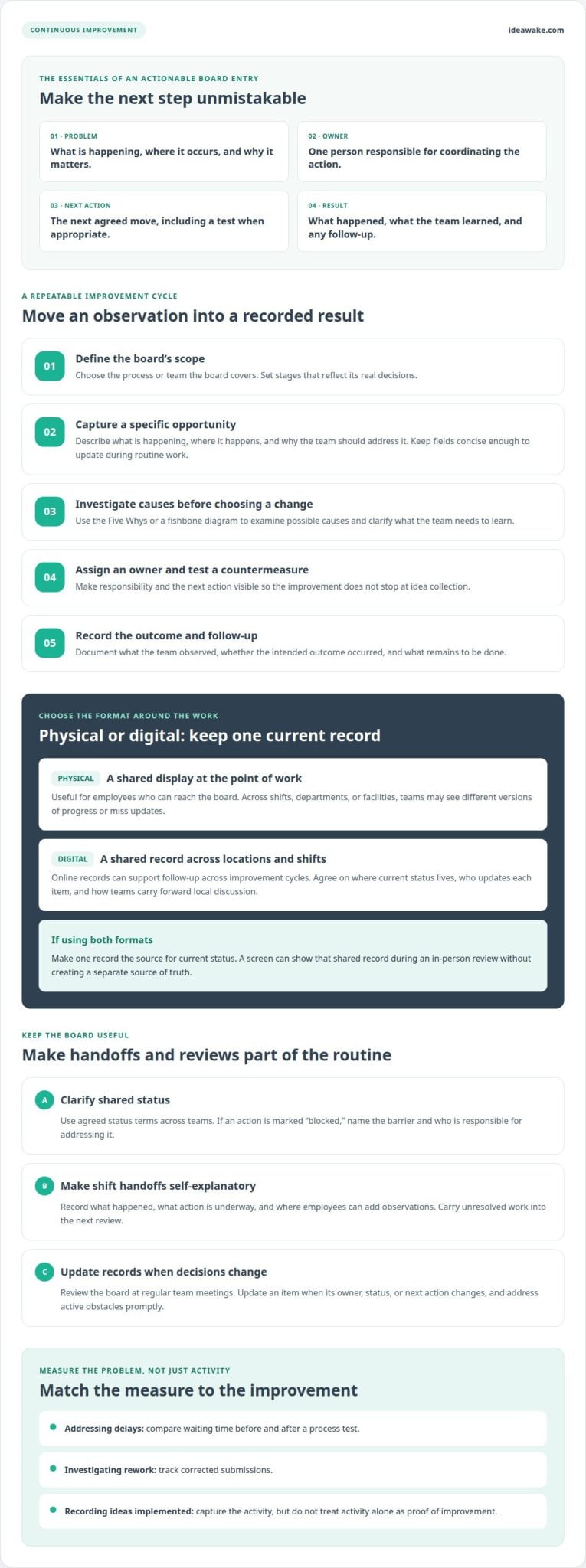
Start by defining the process or team the board will cover. Choose stages that reflect its actual decisions, then agree on what each entry needs: a problem statement, an owner, the next action, and a place to record results. Keep fields concise so employees can update them during routine work, not just formal reviews.
Next, select an initial opportunity and clarify what the team needs to learn. Members can use the Five Whys or a fishbone diagram to examine causes before choosing a countermeasure. Assign an owner to coordinate the test, then record the outcome and any follow-up. This provides a practical structure without forcing every issue into the same investigation.
Board Types and Differences
A Kaizen board tracks improvement efforts, while a Kanban board generally represents workflow. Teams may use Kanban-style stages to show how an improvement action progresses, but the goals differ: improvement work examines how to change a process, while workflow tracking shows how work moves forward.
A suggestion board primarily collects ideas. An improvement process adds evaluation, ownership, action, and a record of what happened. For instance, “reduce duplicate form entry” becomes actionable when a team identifies where duplication occurs, tests a revised handoff, and documents what it learned.
Reviews and Improvement Metrics
Review the board at regular team meetings, and update an item whenever its owner, status, or next action changes. Set the review rhythm to suit the work: address active obstacles promptly, while longer investigations can have planned check-ins. The key is keeping records current enough to support the next decision.
Choose measures linked to the problem. A team addressing delays might compare waiting time before and after a process test; a team investigating rework could track corrected submissions. Also record ideas implemented, but don’t treat activity alone as proof of improvement. For a structured view of Kaizen software use cases, consider how digital records can support follow-up across improvement cycles.
Limits of boards across shifts and sites
A physical board is visible only to employees who can reach it. Across shifts, departments, or facilities, teams may see different versions of progress, miss an action, or repeat work because updates arrive late. Teams working across locations should decide where the current status will be recorded before launching shared improvement work.
Common risks include unclear ownership, outdated cards, too many open actions, and layouts that teams interpret differently. Reduce these risks by assigning one owner per action, defining shared status terms, and carrying unresolved work into the next review. For example, a card marked “blocked” should name the barrier and who is responsible for addressing it.
Different shifts also need a workable handoff. A production employee may report a recurring equipment setup issue near the end of a shift, while the incoming crew needs enough context to continue the investigation. Record what happened, what action is underway, and where employees can add observations. Without those details, a visual display can become a noticeboard rather than a useful reference.
Across facilities, use a common structure without requiring every team to investigate the same problem. Agree on shared fields and status labels, then let each team describe its own process. A warehouse might document a material-flow obstacle, while an office team examines duplicate approvals. Shared terms make progress easier to understand, while local details keep each action relevant.
A mixed physical and digital system can create coordination problems of its own. If one team updates a wall display and another updates an online record, employees may not know which version reflects the latest decision. Agree on one record for current status, and define how local discussion updates will be transferred to it. A screen showing the shared record can support in-person reviews without creating a separate source of truth.
Standardization should preserve local context. A shared template can define an item’s owner, next action, and status while leaving room for site-specific observations. This helps prevent a central team from overlooking meaningful differences or treating identical labels as identical problems. During a cross-site review, ask what changed at each location and whether the intended outcome occurred.
When a team marks an action complete, it should also record the result and any remaining follow-up. Completion alone doesn’t show whether the change helped. A shift handover could note what the team tested, what it observed, and whether another crew needs to adapt the change. That record lets employees learn from previous work without relying on memory or having attended the same meeting.
For cross-site work, agree on who updates each item, how teams escalate blocked actions, and where completed work remains available for reference. A shared digital workflow can help teams coordinate these practices across locations. Explore a coordinated approach to distributed improvement work.
Employee engagement and waste reduction
Employees often see friction before leaders see its operational cost. A useful improvement routine gives team members a practical way to describe that friction, discuss its cause, and help test a change. The board supports participation when submitted ideas receive visible ownership and follow-up, not just acknowledgment.
Engagement depends on what happens after someone raises an issue. For example, a distribution team member may point out that frequently used supplies are stored far from the work area. The supervisor can record the observation, involve employees who do the task, and agree on a small test. Sharing the outcome, including a decision not to adopt the change, shows contributors that their input was considered.
For an enterprise team, improvement work should connect everyday observations to a clear next step. Ask the person closest to the task to describe when the problem occurs, who else is affected, and what makes the current process difficult. A short meeting can then distinguish symptoms from causes and identify an employee to help test a countermeasure. This keeps the discussion grounded in the work rather than assumptions.
Waste reduction starts with a specific example, not a broad demand to “work smarter.” A team can identify waiting, unnecessary movement, rework, or duplicated steps, then record one observable problem. During a meeting, members examine the current process, use the Five Whys to explore causes, and agree on a focused countermeasure. After testing it, they compare the relevant measure with the earlier condition.
Consider a service team that repeatedly enters the same customer details on separate forms. Team members can map where duplication occurs, identify which information is genuinely needed, and test a revised handoff. The test should capture intended effects and possible tradeoffs, such as whether the new step creates extra work elsewhere. An improvement idea earns broader adoption through evidence, not enthusiasm alone.
Use a simple response cycle to turn contributions into action:
- Capture: Record the problem in the employee’s own words, with a concrete work example.
- Discuss: Ask affected team members where the issue occurs and what observations support it.
- Prioritize: Select an improvement idea based on its relevance, feasibility, and connection to team goals.
- Test: Assign an owner and define what observation would show whether the change helped.
- Share: Report the outcome and recognize contributors, including when a test changes or rejects the original proposal.
That routine makes employee input part of operational learning, rather than a separate suggestion channel. Clear participation practices can also strengthen employee ideation programs by connecting ideas to decisions, implementation, and reported outcomes.
Physical and digital Kaizen boards
Choose a format based on where teams work and how they need to share updates. Both formats can support continuous improvement, but they differ in visibility, access, and recordkeeping.
Physical Kaizen Boards
A physical board puts improvement work where employees can discuss it during normal operations. Cards can move through stages such as opportunity, action, and complete, while dry-erase status circles or red, amber, and green indicators show progress. A team can update the display during a meeting, then use it to focus discussion on blocked actions.
Keep the layout readable from the team’s usual meeting point. Use one card for each improvement, with a concise problem statement, owner, next action, and result. Color-coded magnetic labels or status sliders can make changes visible without rewriting each card. For example, a production team could mark a countermeasure as blocked and discuss the barrier at its next huddle.
Physical displays work best when relevant employees can access them and someone keeps the information current. A board in one facility may not serve colleagues working remotely or on another shift. Teams should agree who updates cards after meetings and how completed changes will be shared beyond the room.
Digital Kaizen Boards
A digital format gives teams a shared record they can access across locations. Entries can keep meeting notes alongside improvement details, making decisions and outcomes available for later reference. Managers can view multiple boards remotely and respond to visible roadblocks without waiting for an in-person visit.
Digital layouts can be adjusted, saved, and duplicated when a team finds an arrangement that works. Notifications can keep participants informed as actions progress, while searchable records help teams revisit completed work. For example, a team could review an earlier test before making an incremental change to a similar process.
Digital access doesn’t guarantee useful participation. Teams still need clear owners, current records, and a review routine, or the board can become a stale database. A screen can also display a digital board in a shared workspace, combining face-to-face discussion with records that colleagues across locations can access.
Compare formats against the work itself: physical boards offer immediate local visibility, while digital boards support remote access and retained records. A hybrid approach can use a shared screen for team discussion and digital updates for cross-site coordination. In either format, track the operational measure tied to the improvement, such as rework or waiting, rather than treating card movement as proof of productivity gains.
Plan-Do-Study-Act and prioritization
Plan-Do-Study-Act (PDSA) gives teams a repeatable method for testing a change before adopting it more broadly. A board can make each cycle visible, from defining the problem to documenting what the team learned. This helps prevent a promising idea from going straight to rollout before its effects are understood.
Use the cycle to connect a problem with a documented decision:
- Plan: Describe the issue, the process it affects, the change to test, and the evidence the team will review. A charter can define the scope, participants, and intended outcome.
- Do: Test the proposed change in the relevant workflow. Record who performs each action and any practical obstacles.
- Study: Compare the observed result with the expected outcome. Include employee feedback and unexpected effects, not just the intended measure.
- Act: Adopt the change, revise it for another test, or stop it. Document the decision and assign any follow-up.
For example, a service team investigating incomplete handoffs could plan a revised checklist, test it with one workflow, and study whether required details are consistently transferred. If employees find the checklist unclear, revise it before expanding its use. Record the decision and rationale so the next team understands what was learned, rather than seeing only a completed card.
Prioritization matters when proposed changes compete for attention. Compare each idea against consistent criteria: its connection to team goals, the effect of the problem, the feasibility of a test, and the available evidence. A short decision record can explain why one item moves forward while another waits. Leaders can use idea management software to organize submissions and decisions beyond a local board.
Keep the active queue aligned with available capacity. If several actions depend on the same specialist or approval, record that dependency before assigning more work. The team can then address the constraint, clarify ownership, and bring blocked items to its next review. This makes prioritization an ongoing management practice rather than a one-time ranking exercise.
For a focused improvement event, a charter can frame the issue before the team records observations, root-cause analysis, countermeasures, and actions. Linking these tests to a wider continuous improvement process helps teams carry learning into future work. If you’re considering how to coordinate these cycles, contact Ideawake to discuss your improvement goals.
Ideawake
Ideawake helps organizations connect employee ideas with evaluation, ownership, and implementation. When a local board no longer provides enough visibility across teams or locations, Ideawake’s Idea Management Platform and Continuous Improvement offering can support a broader process for collecting and managing improvement work.
This is useful when leaders need to coordinate submissions, decisions, and follow-up beyond a single team’s physical display. Teams can retain the practical Kaizen cycle while giving employees a consistent way to contribute and track ideas across the organization.
Make Improvement Part of How Work Gets Done
A kaizen board creates more value when it connects local learning with wider organizational priorities. Decide how teams will share useful lessons, who can approve changes that affect other areas, and how leaders will make room for promising tests. These decisions keep employee-led improvement connected to operational goals without turning every small change into a lengthy approval process.
For organizations coordinating ideas across teams, Ideawake’s Innovation Management Platform supports the broader process of capturing, evaluating, and implementing employee ideas. Start with your current improvement priorities and the coordination challenges you need to solve. Keep the focus on making good ideas easier to act on, and let each completed cycle inform the next.
Contact Ideawake to discuss your improvement goals
Every practical change can reveal another opportunity to make work clearer, more effective, and easier for employees to improve. For entrepreneurs and real estate investors looking to refine their business systems and scale alongside experienced peers, The Boardroom Mastermind provides an elite community and educational platform for strategic growth.
Frequently Asked Questions
What Should the Record Hold for Each Improvement?
Record enough detail for someone outside the discussion to understand the improvement later. Include the problem’s location or process, the person who raised it, the current condition, the proposed change, an owner, the status, and supporting evidence. After testing, add the observed result, the decision to adopt or revise the change, and any follow-up. For example, attach a process note describing where a recurring delay occurs.
What does Kaizen stand for?
Kaizen is a Japanese word commonly translated as “change for better.” In work settings, it describes an approach focused on ongoing process improvements, rather than waiting for one large transformation. For example, a team might adjust how it organizes frequently used materials, then observe whether the new arrangement makes the task easier. The practice depends on learning from work and refining changes.
What is a good Kaizen example?
A good example targets a specific, observable source of friction and tests a practical change. Suppose a team repeatedly searches several folders for the latest procedure. It could agree on one shared file location, clarify how updates are labeled, and ask users whether the new method reduces confusion. Before making the new approach standard, the team should record what changed and what it learned, including any unintended problems.
What is a kaizen board and what is it used for?
A kaizen board is a visual aid for organizing improvement opportunities and follow-through. It helps a group see which issues have been raised, what work is active, and which changes are complete or need attention. For instance, a customer-service team could use one to coordinate a test of a revised response process. The board supports discussion and accountability, but team routines and follow-up drive improvement.
What columns and information should an improvement board include?
Use columns that match the team’s actual decision flow, such as “new opportunity,” “under review,” “testing,” and “adopted or closed.” Each item can include a short problem statement, affected process, submitter, owner, next action, status, and evidence of results. Add a reason when an idea is deferred or declined. This context helps employees understand decisions and prevents old items from returning without new information.
What are examples of improvement ideas for manufacturing and office teams?
Manufacturing teams might examine recurring label corrections, unclear tool storage, or avoidable movement between work areas. Office teams could investigate duplicate data entry, repeated approval requests, or confusion over document versions. Each idea should describe a specific occurrence, not a broad goal such as “improve efficiency.” Teams can then identify the affected step, gather observations, and decide whether a small test could address the underlying cause.
What are the best physical and digital tools for creating an improvement board?
The best format is one employees can update and use during their normal work. A physical display can use cards, magnets, and erasable markers for visible team discussions. Digital board software can help colleagues across locations access shared records and review changes remotely. A team working together in one location may prefer a wall display; a group working across multiple sites may benefit from a shared digital record or a combination.
How can teams prioritize improvement ideas and assign owners?
Compare ideas using consistent criteria: the problem’s effect on work, alignment with team priorities, feasibility of testing, and available evidence. Select an owner who can coordinate the next action, involve affected colleagues, and report findings. If another team controls a required approval or resource, record that dependency before work begins. Explain why an idea is selected, deferred, or declined so contributors understand the decision.