

Collecting feedback is easy; turning it into action is the real test. Employee feedback software helps organizations gather employee input, identify patterns, and give managers a practical way to follow up. Recurring pulse surveys can capture feedback between broader engagement reviews.
A platform should do more than distribute surveys and display scores. Look for tools that help you understand employee input, connect it to existing systems and workflows, and support useful manager check-ins. This guide explains how to compare analytics, integrations, and follow-up features, so you can assess whether feedback leads to specific, accountable action rather than simply generating more data.
Key Takeaways
- Prioritize features that turn employee input into clear follow-up, not just another stream of survey results.
- Compare reporting tools by whether they reveal meaningful patterns across teams while protecting confidentiality.
- Assess integrations based on how well they fit existing HR systems and everyday workplace workflows.
- Use manager check-ins to create consistent conversations, clarify next steps, and close the feedback loop.
- Evaluate platforms with a shared scorecard so your selection reflects your organization’s needs, not a feature-count contest.
What is Employee Feedback Software?
Feedback platforms give organizations a structured way to collect, organize, and act on employee input. They may support surveys, open comments, recognition, and manager conversations. The key question is what happens after an employee responds: useful systems help teams identify issues, assign follow-up, and track actions.
For an enterprise, look beyond survey creation. Check whether a platform supports anonymous and identified responses, recurring surveys, audience segmentation, and automated reminders. For example, an HR team might ask about workload and compare responses across departments while protecting individual comments. Review access controls, mobile usability, accessibility, and options for employees without regular desk access.
Employee feedback software varies in how it combines surveys, integrations, analytics, and check-ins. A survey-focused tool can collect satisfaction data; a broader listening platform may connect results to manager follow-up. Compare the workflows employees and managers will actually use, including how people submit feedback and assign actions.
To implement employee feedback software, start with one clear goal, such as understanding onboarding friction. Choose a focused survey, explain who will see the results, and tell employees how leaders will respond. Then share a concrete update, such as a change to a team process, so participation leads to visible action rather than another unanswered request.
Risks include low participation, survey fatigue, misreading small response groups, and collecting sensitive comments without clear access rules. A department-level score, for example, can conceal different experiences across roles. Set expectations about confidentiality, restrict access to raw comments, and consider survey results alongside manager conversations before deciding what to do.
| Platform option | Feedback features | Integrations | Ease of use | Pricing considerations |
|---|---|---|---|---|
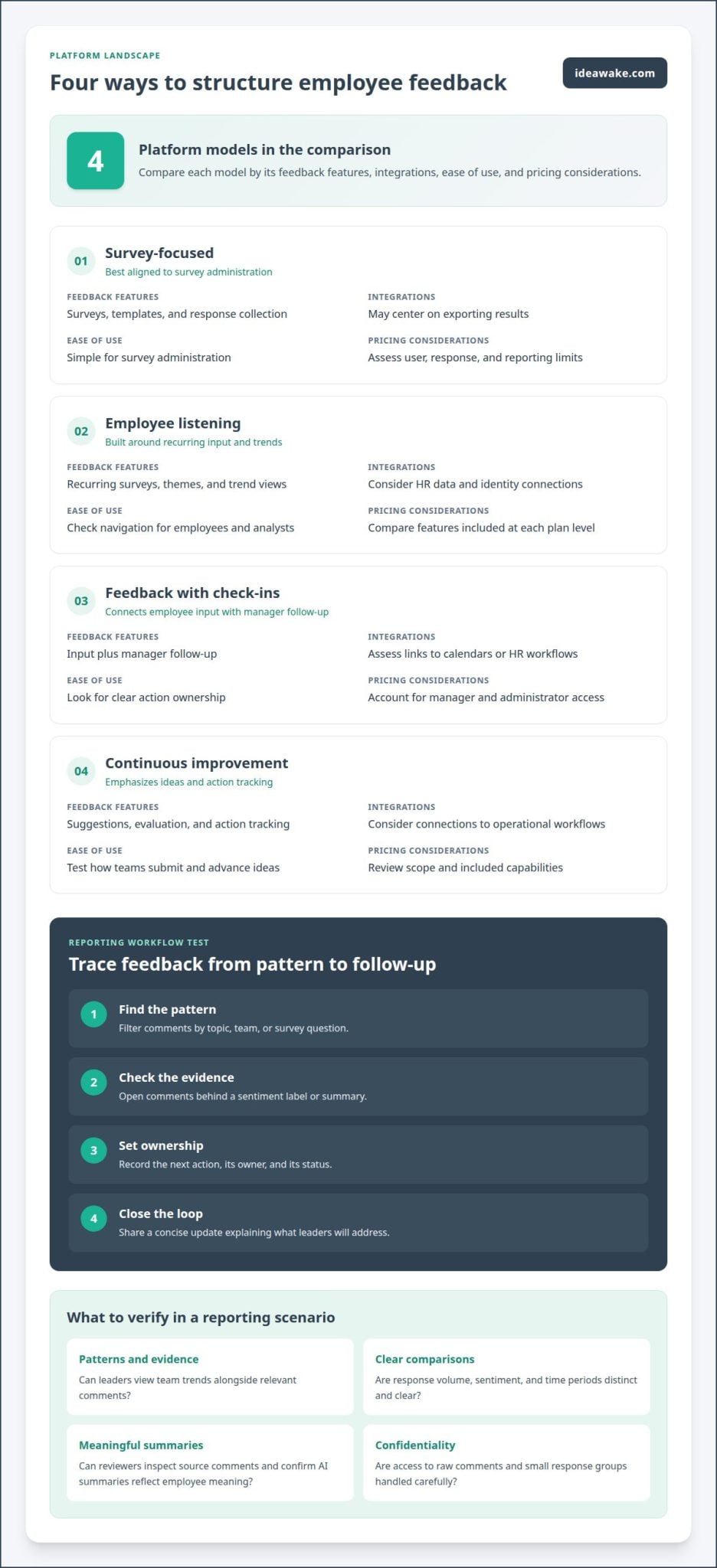
| Survey-focused | Surveys, templates, response collection | May center on exporting results | Simple for survey administration | Assess user, response, and reporting limits |
| Employee listening | Recurring surveys, themes, trend views | Consider HR data and identity connections | Check navigation for employees and analysts | Compare features included at each plan level |
| Feedback with check-ins | Input plus manager follow-up | Assess links to calendars or HR workflows | Look for clear action ownership | Account for manager and administrator access |
| Continuous improvement | Suggestions, evaluation, and action tracking | Consider connections to operational workflows | Test how teams submit and advance ideas | Review scope and included capabilities |
Choose the platform type that matches the work employees need to do, then test one example from submission through recorded response. When employee feedback software must also support improvement initiatives, an AI-powered innovation management platform can provide a related path for capturing and advancing ideas.
Feedback analytics and reporting
Useful reporting turns responses into decisions, not just charts. Compare how platforms organize trends, comments, and follow-up for leaders.
Sentiment Analysis and Heatmaps
Sentiment analysis groups written comments by tone, while heatmaps show patterns across teams or topics. A heatmap might reveal stronger concerns about workload in one department than another. These views help locate themes and differences, but they do not explain the cause. Leaders should be able to review a summary alongside its supporting comments and decide whether the pattern warrants action.
AI-Powered Feedback Analysis
AI-powered analysis can sort large volumes of comments into recurring themes, summarize written responses, or flag changes for review. It may help analysts explore new questions without manually tagging every comment. Treat AI output as a starting point, not a verdict: reviewers should inspect example comments, confirm that summaries reflect employees’ meaning, and restrict sensitive information appropriately.
Assess reporting with a specific decision scenario. Suppose engagement scores fall while comments mention unclear priorities. Can the platform show trends by department, connect them to relevant comments, and help leaders assign follow-up? Check whether dashboards distinguish response volume from sentiment, show time periods clearly, and let users compare the same question across survey cycles. Clear reporting makes evidence easier to interpret.
Before selecting a platform, test these reporting steps with sample feedback:
- Find the pattern: Filter comments by topic, team, or survey question.
- Check the evidence: Open comments behind a sentiment label or summary.
- Set ownership: Record the next action, its owner, and its status.
- Close the loop: Share a concise update explaining what leaders will address.
Templates can make reporting consistent across business units, but leaders should adapt them to the decision at hand. A quarterly engagement review may need a trend view, while a new-process survey may need a focused summary of employee suggestions. Compare how long it takes to find those views and whether reports support clear next steps.
For organizations connecting employee input with improvement work, an analytics-to-action workflow can help illustrate how feedback becomes trackable ideas.
Integration with HR systems and workplace tools
Integrations determine whether feedback fits existing employee workflows or creates another disconnected system. Map how a response moves from a pulse survey through analysis and follow-up to reporting. For example, decide whether HR teams need workforce data for segmentation, managers need reminders in workplace tools, or leaders need summary reports in existing dashboards.
Start with the systems your organization relies on, such as its human resources information system (HRIS), identity management, collaboration tools, and reporting environment. Define what data each connection should use. An HRIS may provide department or location attributes, while a collaboration tool may make survey invitations easier to find. Keep the purpose specific: a feedback tool should not receive employee fields that do not support analysis or follow-up.
Check how integrations handle identity and anonymity. If a survey promises anonymous responses, determine whether identity data is separated from answers and how reports handle small groups. Managers may need team-level sentiment, for example, without access to identifiable comments. Explain intended access to employees before launching surveys, and ensure reporting permissions match those expectations.
Mobile access matters for employees who rarely work at a desk. Test a complete task on a phone: open an invitation, answer a pulse survey, submit a comment, and view the confirmation. Check that text is readable, response controls are easy to use, and the session works in the organization’s usual mobile environment. A polished desktop workflow cannot make up for a difficult frontline experience.
Use this integration review before a pilot:
- List the systems: Name the HRIS, identity service, collaboration tools, and reporting destination involved.
- Trace each data field: Record where department, location, and role information originates and where it appears.
- Test permissions: Sign in as an employee, manager, and administrator to compare access.
- Try failure scenarios: Check what happens when an employee changes teams or loses access to a connected tool.
- Measure workflow friction: Ask pilot participants to complete the same survey on desktop and mobile.
Prefer integrations that support a defined workflow over a long list of connections with unclear value. For instance, connecting employee groups to survey reporting can help compare responses consistently, while collaboration alerts can support timely follow-up. A well-planned integration strategy should specify data ownership, access, and the process when a connection changes.
Document the result in a simple matrix: system, data shared, purpose, user access, and fallback process. Review each row with HR, IT, and the employees who will use the platform. This practical test exposes gaps before rollout and keeps integrations accountable to the feedback process.
Manager check-ins and constructive feedback
Survey results matter only when managers can respond through useful conversations and clear follow-through. Regular check-ins give employees a consistent opportunity to raise concerns, discuss progress, and ask for support. They also give managers a practical setting to clarify feedback and agree on next steps. Without that conversation, collected input can remain disconnected from daily work.
A strong check-in gives both people room to discuss progress, obstacles, and support. Managers can start with a specific observation, ask an open question, and agree on a next step. If an employee reports unclear priorities, for example, the manager can review competing tasks together and set a shared order. Constructive feedback describes behavior and impact, then invites the employee’s perspective.
Choose a platform that helps managers turn themes into owned actions. It should make it easy to record a commitment, assign responsibility, set a review point, and update status. A team might respond to recurring schedule concerns by testing a new handoff process, then revisiting the issue in a later check-in. Without ownership and follow-up, action planning becomes a list of intentions.
Performance management reporting should support coaching, not reduce employee experience to a score. Keep survey trends separate from individual performance records, and make clear which information managers can access. A team-level concern about workload, for example, can guide a discussion about staffing or priorities without turning one response into a performance judgment. Consistent reporting helps leaders see whether actions are complete and where managers need support.
Assess manager follow-through using observable evidence: completed actions, recurring concerns, and employee updates on whether a change helped. Avoid assigning financial returns to a check-in alone. Instead, connect an intervention to a defined operational outcome, such as fewer repeated handoff issues, and document the baseline and later observations using the same method.
Use this simple check-in sequence to make continuous feedback specific:
- Listen: Ask what is helping or hindering the employee’s work.
- Clarify: Reflect the concern and confirm the practical issue.
- Agree: Choose an action, an owner, and a follow-up point.
- Recognize: Acknowledge progress or contributions with a concrete example.
- Review: Return to the commitment and record what changed.
Before rollout, ask managers to practise with a realistic scenario, such as feedback about unclear decision-making. The platform should make the next step visible without turning a conversation into a form-filling exercise. An effective employee engagement approach connects listening, manager coaching, and follow-through while keeping each conversation human.
How employee feedback tools were evaluated
A useful comparison needs more than feature counts. Evaluate each platform against the same employee scenarios, then record the evidence behind each decision. This helps distinguish a polished demonstration from a workflow employees, managers, and administrators can use in practice.
User reviews can surface practical concerns, such as confusing navigation or reporting limitations. Treat them as one consideration, not a substitute for testing. A reviewer’s experience may reflect a different organization size, survey process, or implementation context. Look for recurring details relevant to your requirements, then test those needs in a representative workflow.
Build a scorecard around the decisions your organization needs to make. Compare platforms against the same use cases, such as running engagement surveys, finding recurring themes, and assigning action plans. Record evidence from a product walkthrough or pilot, rather than relying on assumptions based on feature labels.
- Feedback collection: Test whether employees can complete a survey and submit comments through the channels they use.
- Analysis: Check whether reports connect scores, written feedback, and relevant employee groups.
- Integrations: Trace one workflow between the feedback platform and a system your organization already uses.
- Manager follow-through: Confirm that a manager can assign an action, track progress, and report back.
- Usability and access: Have employees, managers, and administrators complete relevant tasks using their own roles.
Weight criteria according to operational importance. An organization with distributed teams may prioritize mobile participation and consistent access, while an HR team focused on employee experience may emphasize trend analysis and manager follow-up. Set the weights before reviewing platforms, then document why each tool scored well or poorly against each requirement.
Separate minimum requirements from differentiators. A minimum might be secure, role-based access or an integration needed for an existing workflow. A differentiator might be easier comment analysis or clearer action tracking. This keeps an attractive extra feature from outweighing a gap that could disrupt an essential process.
Finish with a representative pilot. Give a cross-functional group the same scenario, such as identifying a recurring concern and creating a response plan. Record completion issues, interpretation gaps, and handoff delays. The best fit is the platform that makes the required process clear and repeatable, not simply the one with the longest feature list.
Ideawake: Innovation Management Platform
Ideawake’s Innovation Management Platform helps organizations capture, evaluate, and implement ideas from employees, customers, and partners. It is a fit when employee feedback reveals opportunities that need a clear path from suggestion to review and action. Teams can use an Idea Management Platform to organize proposals and assess their potential, rather than treating every comment as a survey response. Ideawake AI and gamification features, including voting, leaderboards, and prizes, support participation in idea programs. The platform also supports Continuous Improvement, helping organizations connect employee suggestions with ongoing improvement work. It’s a practical next step when your feedback process needs to extend beyond listening and manage ideas across their lifecycle. Explore how Ideawake can fit your organization’s needs at ideawake.com.
Make the Next Step Visible
The next decision is not simply which employee feedback software has the broadest feature set. Decide what should happen when employees identify an opportunity, who will assess it, and how the organization will communicate progress. That operating model gives your evaluation a practical test: can the right people move from employee input to an owned initiative?
For organizations ready to manage suggestions beyond survey reporting, Ideawake offers an Innovation Management Platform, an Idea Management Platform, and Continuous Improvement. These offerings help structure the path from idea submission through evaluation and implementation. Start with a real feedback theme, define who should review related ideas, and agree how employees will hear what happens next. Clear ownership turns listening into visible organizational learning.
Bring your intended workflow and priorities to a conversation with Ideawake. Discuss how idea management can fit your employee feedback process and improvement goals.
Keep employee input connected to meaningful work, and give every useful idea a clear next step.
Frequently Asked Questions
Can I customize the surveys to align with my organization’s needs?
Yes, survey design can reflect your organization’s goals, language, and workforce groups. An operations team might ask about handoff issues, for example, while HR explores onboarding experiences. Before launching, define which decision each question should inform, keep wording consistent when comparing responses, and leave room for explanations. Avoid collecting information that does not support a clear action or help leaders understand employee experience.
What are the best feedback tools for enterprises?
The best fit supports your workforce structure, privacy expectations, reporting needs, and follow-up process. An enterprise with frontline and office-based teams, for example, may need accessible participation across different work settings. Compare tools using identical employee scenarios, then assess administrator access, reporting clarity, and how teams communicate actions. A long feature list alone does not establish enterprise suitability; test the workflows your teams will actually rely on.
Which platforms allow real-time feedback and analytics?
Look for tools that show responses and reporting updates as feedback arrives, distinguishing this from alerts or scheduled report refreshes. During a pilot, submit a test response and observe when it appears in the relevant dashboard. Check whether views update by team or topic, and whether managers can act on the signal. “Real time” is useful only when information is timely and easy to interpret.
What is employee feedback software and how does it work?
Employee feedback software collects employee input through digital channels and organizes it for review. An organization can ask about a new scheduling process, group responses by relevant work area, and use the findings to guide a team discussion. The process works best when employees understand why their input is requested and leaders explain what they learned. The platform supports the process, but people still make decisions.
What features should a feedback platform include?
Prioritize survey creation, audience targeting, clear reporting, privacy controls, and a way to track follow-up. A useful system should also make participation practical across the devices and channels employees use. Test whether an employee can complete a questionnaire and whether a manager can review relevant themes without seeing restricted information. Choose features based on workflow requirements, not simply because a tool offers more options.
What are the best platforms for employee feedback in 2026?
There isn’t one best platform for every organization in 2026. Create a shortlist based on workforce needs, existing systems, analytics requirements, and manager workflows, then test each against the same use case. For instance, ask every shortlisted tool to support a feedback cycle about a policy change, from collecting responses to communicating an update. Compare evidence against your criteria, not marketing language or feature counts.
How much does employee feedback software cost in the United States?
Costs depend on workforce size, required capabilities, implementation needs, integrations, and support. To build a useful budget comparison, define user groups, reporting and privacy requirements, and the workflows you expect to support. Then compare options against the same scope, including optional services and usage limits. The lowest initial quote may not reflect the full cost of operating the program or maintaining its processes.
Which employee feedback tools offer free plans or trials?
Free plans and trials vary by platform and commercial terms, so compare the access each option provides. Review trial length, user or response limits, reporting access, integration availability, and export options. A small test should include employee participation and administrator follow-up. This reveals whether the tool supports your actual workflow, rather than merely demonstrating a survey form. Define success criteria before inviting participants.